OO programming
Object Oriented is an approach to programming that uses 'objects' in designing applications. These object data structures have certain characteristics:
- They consist of data and methods
- Data is enclosed inside the object and methods are used to access it
- This is called 'encapsulation' and it ensures the appropriate use of the data
- The objects within any program interact to achieve the program's aim
Objects & classes
Objects are made from classes.
- You start with a class which consists of:
- Data - information to be remembered
- Methods - define how the class behaves
- From any one class you can make multiple objects:
- Each of these objects is unique
- These objects are independent from one another
- Their data type is their class's name
Classes
Objects
What comes first?
A class must exist first - either a Java Library class or a class that you write yourself.
- Once a class exists any number of objects can be built from it
- A class's existence continues throughout the entire run-time of a program
- The class doesn't know about the existence of any of it's objects
- An object doesn't exist until it's built and you can kill it at any time during program run-time
- The object always has a connection to it's class
Class overview
A class is a blueprint or masterplan from which objects are made.
- Some classes already exist (in the Java library) and are there for you to just start using (eg String class)
- Other classes you build yourself
- The class is where you write the data, and the methods that will work on that data
- You can have as many classes as your program design needs.
- And each class should have a unique name.
What exactly is a class?
A class is an individual file in your program.
- Any class you write has a .java file extension -
- This is the source file
- It's plain text
- This is the file that you write in
- The Java compiler translates this .java file into a .class file
- This is a bytecode file that the JVM can read to run the program
- You can't read this file - it's machine instructions
A class contains:
A class basically holds two things:
- Data (fields) - the remembering part
- Primitive variables
- Objects of another class
- References to objects
- Methods - the doing part
- Methods can manipulate the class's data
- Or they can return the remembered values held in the data
- Or they can do both
When to build one
Whenever you have a complex entity in your program you'll probably want to represent it as a class.
- Does it remember more than one thing?
- Do you want these remembered values to be associated together throughout the program?
- Do you wish to manipulate or change the values in any way?
- Do you want to control how these values are accessed?
Try a class.
Class syntax
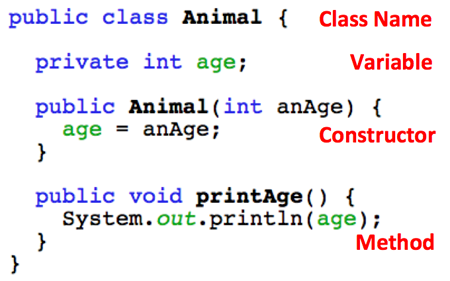
See a simple class below (the explanation of it's parts is in red):
Constructors
A constructor looks like a method but it's a bit different.
- It's called to create an object of a class
- The Constructor's name is the same as the class's name
- It can receive values through it's parameter list and set the values of variables at object creation
- It's called using the keyword
new
- It has no return type
- It has no return statement
An example ...
Constructors
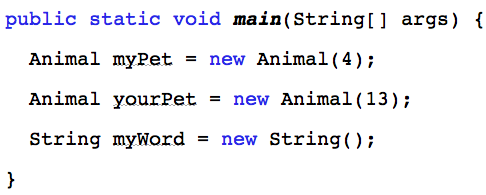
There are 3 objects created here using the constructor:
- 2 Animal objects - called myPet & yourPet
- 1 String object - called myWord
Statics
Not all variables & methods in a class have to be unique to one object created from that class.
- Declare these with the
static modifier
- There is only one copy of a static variable or method
- They belong to the class and are shared by all objects of that class
- Either the class or an object can use them
Why use statics ...
Statics
- Maybe there are some things the class wants to remember or do without having to rely on an object being created, such as:
- Have any objects been created
- How many objects of this class are there
- Increment a numeric object ID value
- Use a static
Write a static ...
Use a static ...
Statics
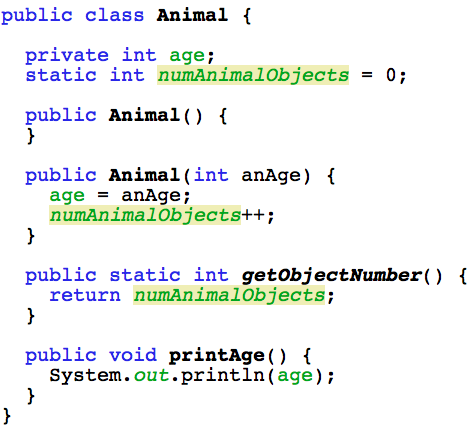
Writing a static variable and method -
Statics
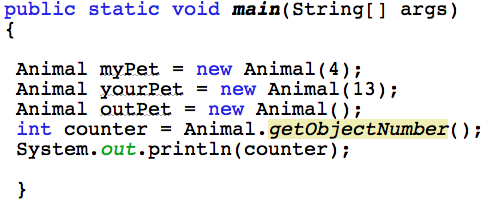
A static method can be used anywhere the class itself is accessible. Just use the class name to call it:
- the value returned to counter is 3
Connections
Although each class is unique it is not fully independent of all other classes.
- All classes are connected to the Object super class through inheritance
- Some classes have other classes between them and the Object class in the hierarchy
- Some classes also have classes below them in the hierarchy
Object overview
- An object is called a concrete implementation of a class
- Or an instance of a class
- If you have access to the class, you can create an object from it
- One class can have many objects
- The objects of any one class are independent of one another
- You retain access to the object through it's Object Reference Variable
How to build one
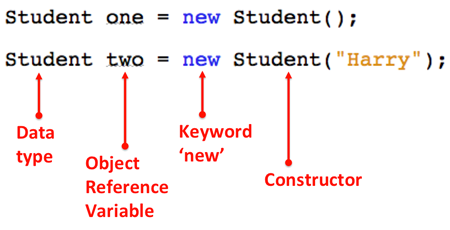
- You need a variable that will reference the object - called an Object Reference Variable
- This variable is your connection to the object, it's data & methods
- And you need the keyword
new
- without
new there's no object
- Objects must also have data type
An example ...
How to build
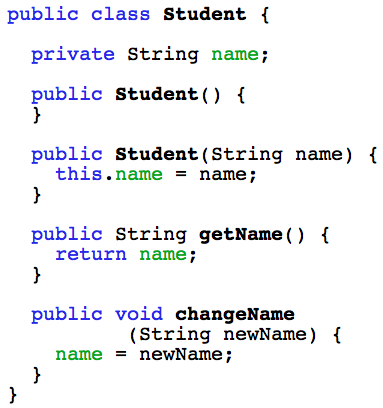
First, you must have a class - eg Student.
Then put together the parts needed to build an object:
Where to build an object
Mostly, you build an object of one class inside another class. Here it is done in the main class, but later you can do this in other classes that you build also.
We're starting with two classes -
- the main class ( the class containing the
main method) - Student class
- an object of Student will be created in the main class
See the class first ...
Start with a class
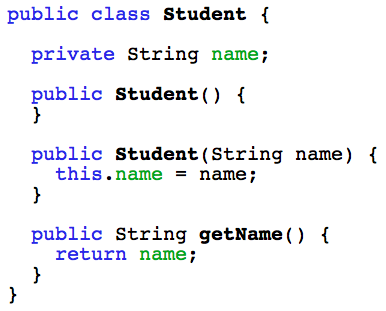
Here's the class:
 Now see the objects ...
Build the object
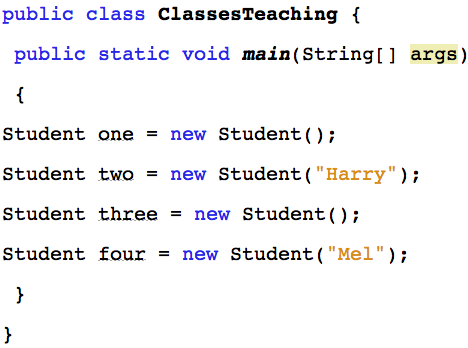
Four objects of the Student class created in another class:
Object Data Types
- All data in Java has a type, including objects.
- A data type is a set of values and the operations defined on those values:
- A String object has a String data type & the operations on it are defined by the methods of the String class
- A Student object has a Student data type & the operations on it are defined by the methods of the Student class
- The data type of any object is it's class's name
Obj Ref Variables
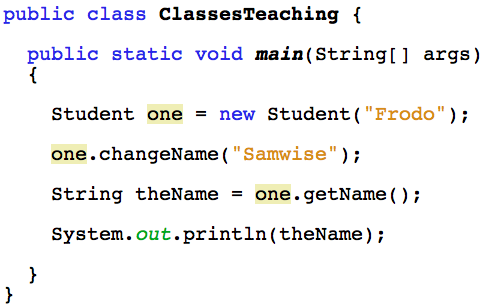
An object reference variable keeps hold of an object. Use object references to -
- Define a unique name for any object
- Then use that name to:
- call the methods
- change the data
- get the object's data
- remove the object (set it to null)
- The class ...
- The object ...
Obj Ref Variables
Here's the Student class:
Obj Ref Variables
Using the object reference variable (one) to manipulate & retrieve the object's data:
Multiple objects
What if there's more than one object? How do you know which is which and what holds what?
- Each object is accessed by it's unique object reference variable
- Use this variable to manipulate that object
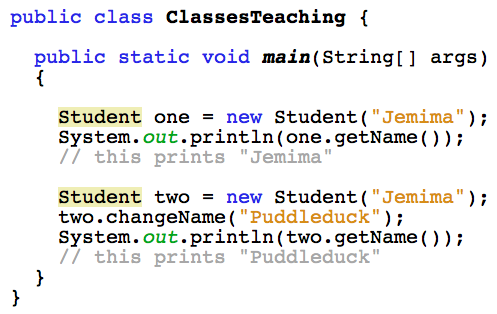
- Here's an example of two Student objects,
one & two
The two objects ...
Multiple objects
Two separate objects accessed & manipulated by their reference variables: